![(please configure the [header_logo] section in trac.ini)](http://www1.pconline.com.cn/hr/2009/global/images/logo.gif)
开发工具
服务器:resin 3.0.14
编程工具:eclipse3.2
浏览器:IE6或者遨游1.6版本。(注意:如果是IE8有可能出现无法显示菜单的。火狐和遨游高版本有可能出现无法显示下拉框内容的情况)
具体配置过程
配置resin:
1.在 resin_mis.conf 里新建一个应用,如 mis2 的配置文件在 </host> 前加一行
<web-app id='/mis' document-directory="D:\workspace\mis2\src\web"/>
2.在 resin_mis.conf 文件中配置数据库。
<database>
<jndi-name>jdbc/mis</jndi-name>
<driver type="oracle.jdbc.driver.OracleDriver?">
<url>jdbc:oracle:thin:@192.168.10.204:1521:dev204</url>
<user>用户名</user>
<password>密码</password>
</driver>
<prepared-statement-cache-size>8</prepared-statement-cache-size>
<max-connections>20</max-connections>
<max-idle-time>30s</max-idle-time>
</database>
配置Eclipse调试环境:
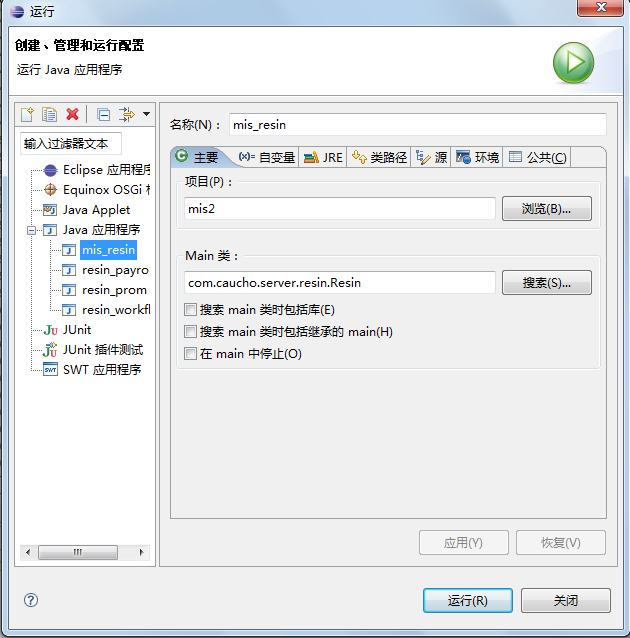
1选择Run->Run Configurations->新建Java Application。
2.Man class:com.caucho.server.resin.Resin
Project:选择你的mis2项目

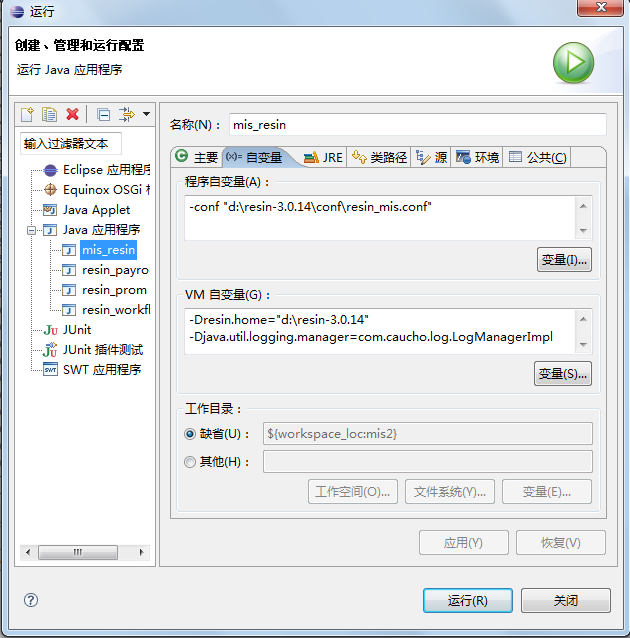
3.Program arguments:-conf "D:\resin-3.0.14\conf\resin_mis.conf"
VM arguments:-Dresin.home="D:\resin-3.0.14" -Djava.util.logging.manager=com.caucho.log.LogManagerImpl?

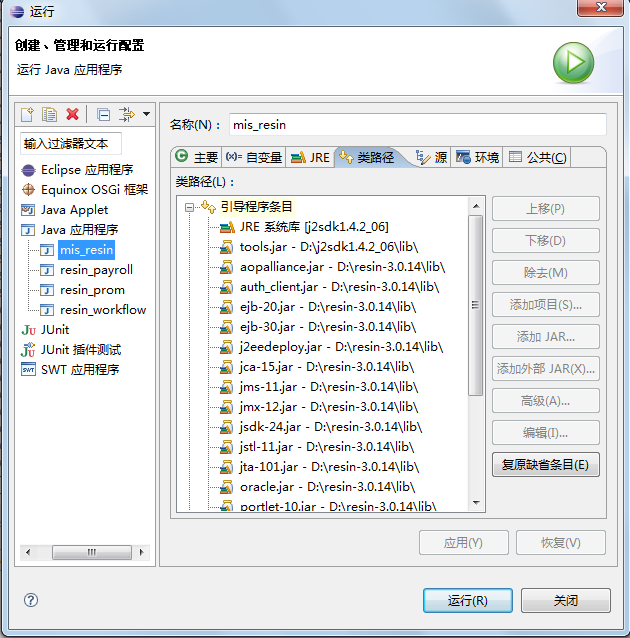
4.Classpath的Bootstrap Entries中,添加resin根目录下的lib文件夹中的所有jar,还有jdk lib下的tools.jar。

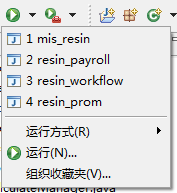
5.配置好之后点击“应用”按钮,然后点击下面的“运行”按钮即可运行该项目。并且在工具栏的 Run 工具下会多出一个刚才配置的 Resin2 运行。

Attachments
-
explam1.png
 (68.6 KB) -
added by xiejing 15 years ago.
(68.6 KB) -
added by xiejing 15 years ago.
-
explam2.png
(72.9 KB) -
added by xiejing 15 years ago.
-
explam3.png
(88.9 KB) -
added by xiejing 15 years ago.
-
explam4.png
(7.7 KB) -
added by xiejing 15 years ago.