![(please configure the [header_logo] section in trac.ini)](http://www1.pconline.com.cn/hr/2009/global/images/logo.gif)
Ticket #93 (closed 总结: fixed)
报价库索引页的筛选项如何露出及如何根据筛选项查询产品
| Reported by: | yuanhuoqing | Owned by: | yuanhuoqing |
|---|---|---|---|
| Priority: | major | Milestone: | |
| Component: | 产品库 | Version: | 产品库3.0 |
| Keywords: | Cc: | ||
| Due Date: | 09/03/2012 |
Description (last modified by yuanhuoqing) (diff)
一、报价库索引页的筛选项如何露出
产品库后台用户操作流程:
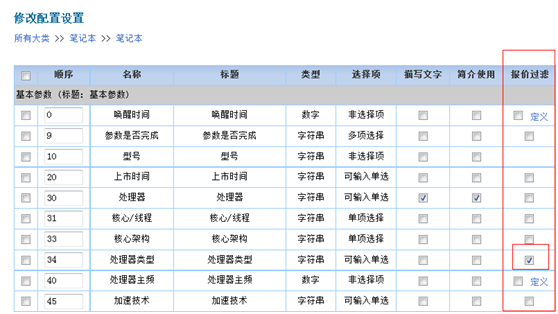
1、设置需要露出的配置项
进入小类下的配置列表,然后在报价过滤列中勾选上,并对已勾选上配置的排序数字调整下,因为程序根据排序数字从低到高排序出前6个配置项;
如图: ;
;
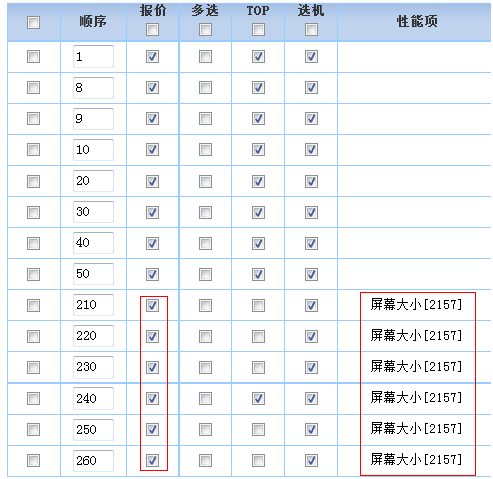
2、设置配置项对应的自定义查询
进入小类下的自定义查询列表,然后对第一步勾选配置项对应的自定义查询在报价一栏中勾选上,如下图:
 ;
;
程序实现原理:
1、查出需要在索引页露出的配置项,示例sql(手机小类)如下:
select * from (select * from pdl_config_item where group_flag=1 and config_id=20937 order by order_key asc, id) where rownum<=6
2、循环上一步返回的配置项结果集,根据配置项id去查对应的自定义查询项,
示例sql(手机小类)如下:
select * from pdl_defined_criteria t where t.group_flag = 1 and t.item_id = ? order by t.order_key asc
二、如何根据筛选项查询产品
1、数据准备
产品属性的数据库表结构采用EAV(Entity-Attribute-Value)数据模型,查询产品的信息比较复杂,为了提高查询效率和方便查询,对产品的信息作了简化把需要查询和用到的字段拉直成一个表:pdl_product_front
主要根据设置露出的配置项按排序数字从低到高排序出前6个配置项的顺序把对应的参数值取出来分别插入dl_product_front的item1、item2、item3、item4、item5、item6各个字段中,具体参见存储过程:P_PDLPRODUCTFRONT_ADD
2、查询
根据筛选项所属的配置项的顺序查对应的pdl_product_front的itemX的值。
Attachments
Change History
Note: See
TracTickets for help on using
tickets.