![(please configure the [header_logo] section in trac.ini)](http://www1.pconline.com.cn/hr/2009/global/images/logo.gif)
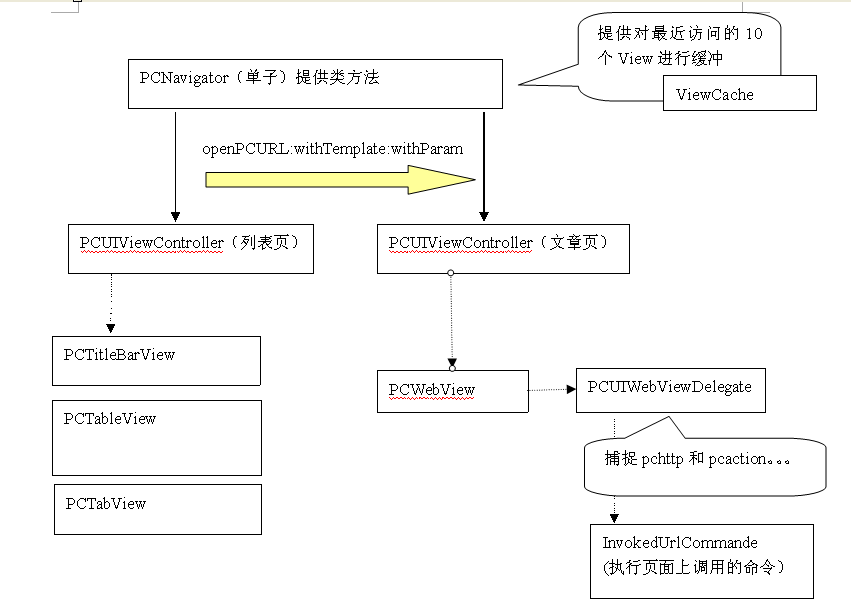
UI切换事件的相应主要有3种方式:
1:控件内部事件,控件自己捕捉和处理相应
2:同一个视图下的控件消息采用总线(notification)方式传输消息
3:不同视图的切换采用navigator提供的静态方法处理

模板的例子,PCUIViewController复制View的生成
模板先支持一层结构,object代表组件 组件可以设置属性,现在支持string,int,bool和property属性 key表示组件中对应的属性名字
<?xml version="1.0" encoding="UTF-8"?>
<archive type="cn.pconline.IOSTemplate.xml" version="0.10">
<layout>
<object class="PCTabView" id="PCTabView1">
<string key="Frame">{{0, 420}, {320, 50}}</string>
<bool key="BackButton?">YES</string>
<int key="ButtonNum?">4</int>
<property key="Config">
url=MainFrame2
bgPhoto=pcauto_tabbar_information.png
</property>
</object>
<object class="PCTableView" id="PCTableView1">
<string key="Frame">{{0, 50}, {320, 350}}</string>
<string key="Url"> http://mrobot.pcauto.com.cn/v2/cms/channels/1</string>
</object>
</layout>
</archive>
界面组件:
顶栏:显示标题,回退,上下文功能
栏目切换栏:
功能切换栏:底部
文章列表:有更新,更多,异步下载图片的功能
文章内容查看:能响应pcaction,pchttp协议,显示评论数,页码,分享和调用计数器功能
JSON 模板
开发过程中遇到部分XML解析功能不能正常使用,现尝试使用JSON完成当前版本 的部分模板,示例如下:
{
    "class":"Category",
    "title bar":{"class":"CategoryBar",
                "FunctionButton":{"class":"ContextMenu"
                }
               },
    "tool bar":{"class":"ChannelBar",
               "default index":1
               },
    "content view":{"class":"ChannelView",
                    "cell template":{"class":"information cell",
                                     "image":{"frame":[5, 5, 80, 60]},
                                     "title":{"frame":[90, 1, 230, 20]},
                                     "publish date":{"frame":[90, 21, 115, 10]},
                                     "summary":{"frame":[90, 31, 230, 35]}
                                    }
                   },
    "function bar":{"class":"tab bar",
                    "items":[{"title":"资讯",
                              "uri":"category://information"
                             },
                             {"title":"产品库",
                              "uri":"category://production"
                             },
                             {"title":"论坛",
                              "uri":"category://bbs"
                             },
                             {"title":"更多"
                              "uri":"category://more"}
                            ]
                   }
}